
Learn AutoCAD basics: DAY 5
Hope we have providing some insights to you with this series of learning AutoCAD through exercises.
We previously worked on exercises that helped us master the following:
- The use of the LINE command in AutoCAD
- The use of the CIRCLE command in AutoCAD
- The use of the TRIM command in AutoCAD
- The USE of the UCS command in AutoCAD
- and more
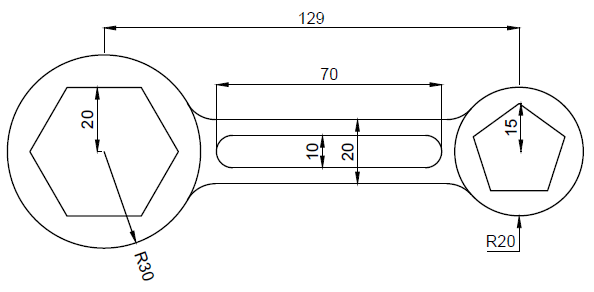
Today, we are going to continue learning and the object that will allow us do that is shown below.
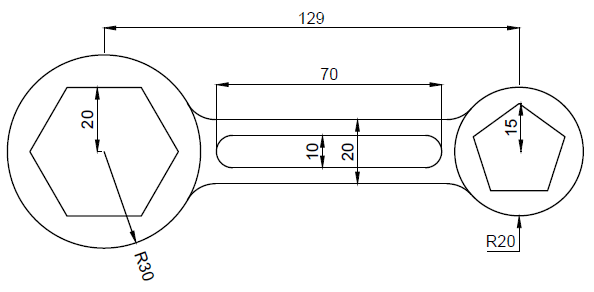
As you can see the only added tools here is the POLYGON command which you will have to learn if you want to successfully replicate the image above.
LEARNING AUTOCAD BASICS
It is important to have you see the following.
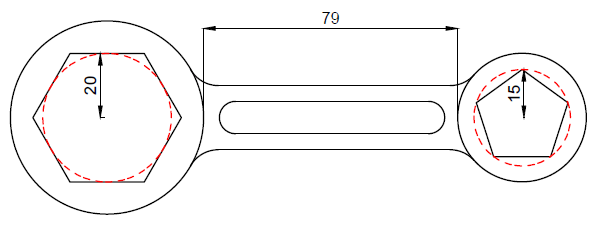
It is important to understand that the two polygons do not have same characteristics. The Polygon on the left side of the image is a 6 side polygon circumscribed about a circle of R=20 and the Polygon on the right is a 5 side polygon inscribed in a circle of R=15. (illustrated on the image using the dashed red circle)
All fillet are R=10 units and remember that you need to learn how to create a polygon in AutoCAD before attempting to do this exercise.
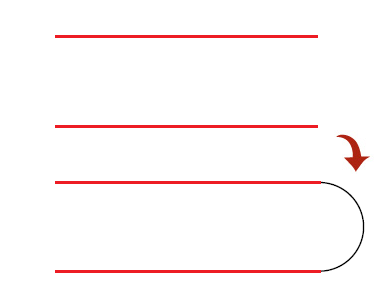
A TRICK YOU CAN USE
It is possible to use the FILLET command on two parallel lines.
Using all we have learned in previous sessions you should be able to come out of this one without any hassle.


