Graphic World

Categories
Learning Tutorials Videos

An Introduction To UVMapping In 3d Studio Max Using The Unwrap UVW Modifier, Part 2

This post is part of a series called An Introduction To UVMapping In 3d Studio Max. An Introduction To UVMapping In 3d Studio Max Using The Unwrap UVW Modifier

In the second part we’ll take what we learned in part one and uv map an entire scene using the Unwrap UVW modifier in 3d Studio Max 2012. We’ll look at some ways to approach high-res subdivided geometry, and ways we can minimize texture stretching and distortion.

After we have UVs applied to every object, we’ll look at attaching and packing everything together in a single layout in preparation for map generation and texturing. All in all I’m hoping this tutorial will help shed some light on what is considered a major stumbling block by many beginners.

Note: click the ‘Monitor’ icon to view tutorial in full-screen HD.
Categories
Learning Tutorials Videos

Quick Tip: Assigning Hotkeys & Making Custom Menus In 3d Studio Max

Quick Tip: Assigning Hotkeys & Making Custom Menus In 3d Studio Max

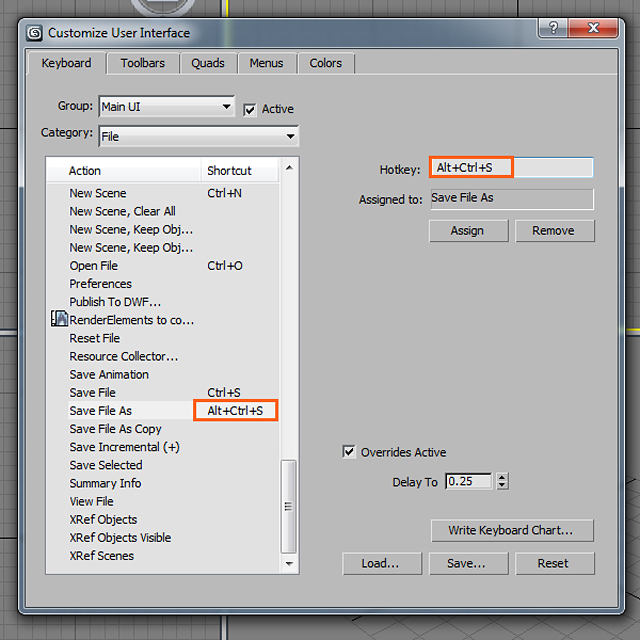
One of the most important steps in building a better, faster workflow is the addition of Hotkeys. These simple shortcut commands might only shave seconds off at a time, but in the long run those seconds can add up to hours. In this quick tip from Chandan Kumar, you’ll learn how to save time and work more efficiently by creating your own custom tool menus right inside of 3ds Max’s UI, and how to setup keyboard shortcuts for the tools you use most.

Note: click the ‘Monitor’ icon to view tutorial in full-screen HD.